You landed your first international client. They want to pay you $500 for a project. Now what?
This is the point where many South Asian freelancers stall. The client says "How do you want to be paid?" and you're not sure what to answer. You've heard of Wise. You've heard of PayPal. Your uncle says bank wire is best. Your friend says Payoneer. Nobody seems to agree, and the fee structures are so opaque that you can't figure out what you'll actually receive.
This guide is our attempt to cut through that confusion. We'll compare the three main options — Wise, Payoneer, and SWIFT bank transfers — with specific details for freelancers in India, Pakistan, and Bangladesh. Real fees. Real conversion rates. Real setup steps. No affiliate links, no sponsored recommendations.
The Quick Comparison
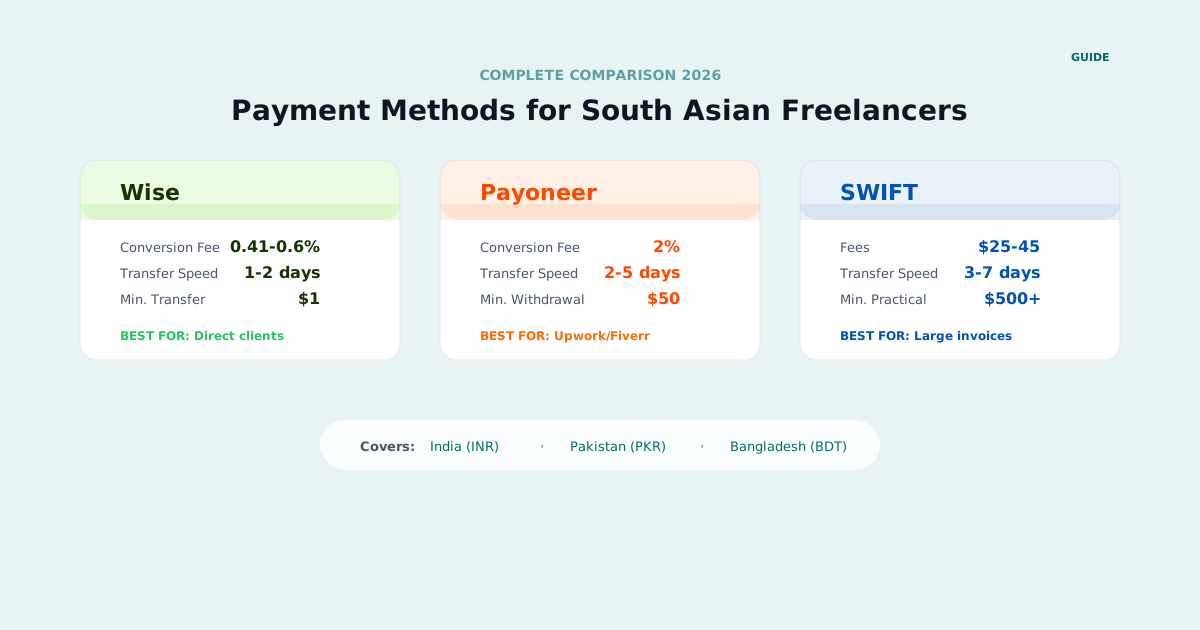
Before we get into the details, here's the summary table. If you're in a hurry, this is what you need:
| Feature | Wise | Payoneer | SWIFT Bank Transfer |
|---|---|---|---|
| Setup time | 1-2 business days | 2-5 business days | Already have a bank account |
| Receiving USD from clients | Free (via USD bank details) | Free (via USD bank details) | $15-45 incoming wire fee |
| Conversion fee (USD to local) | 0.5-0.8% | 1-2% above mid-market | 2-5% (bank sets rate) |
| Transfer to local bank | Free or low cost | $1.50-2 per withdrawal | N/A (already in bank) |
| Total cost on $1,000 | ~$6-8 | ~$12-22 | ~$35-65 |
| Speed (to local bank) | 1-2 business days | 2-5 business days | 2-5 business days |
| Minimum payment | None | $20-50 depending on method | Varies by bank ($50-100 typical) |
| Best for | Most freelancers, regular payments | Marketplace payouts, larger volumes | Large one-time payments ($5,000+) |
Now let's break each one down in detail.
Wise (Formerly TransferWise)
Wise is what most freelancers in our community end up using, and for good reason. It offers the closest thing to the real exchange rate you'll find, with transparent fees that you can see before confirming any transaction.
How Wise Works
When you sign up for a Wise account, you get what they call "bank details" in multiple currencies. For USD, you receive a US bank account number and routing number (held at a partner bank in the US). Your client can send money to these details just like they'd pay any US-based vendor — via ACH transfer, wire, or even from their own bank's bill pay feature.
The money arrives in your Wise USD balance. From there, you convert it to your local currency and transfer it to your local bank account. You control when you convert, so you can wait for a favorable exchange rate if you want.
Wise Fees Breakdown
Receiving money: Free. When your client sends USD to your Wise bank details via ACH, there's no fee on your end. If they send via wire, Wise still doesn't charge you, but some intermediary banks may deduct a small amount ($5-15) in transit — this is uncommon with ACH but can happen with wire transfers.
Conversion: Wise uses the mid-market exchange rate — the same rate you see on Google or XE.com — and adds a transparent fee on top. For USD to INR, this fee is typically 0.5-0.8% of the amount. For USD to PKR, it's around 0.8-1.2%. For USD to BDT, it's about 0.6-1.0%.
Let's make this concrete. On a $1,000 conversion to INR:
- Mid-market rate (example): 1 USD = 83.25 INR
- Your bank's rate (typical): 1 USD = 80.50 INR (3.3% markup)
- Wise rate: 1 USD = 83.25 INR minus 0.7% fee
| Method | Rate Used | You Receive | Cost |
|---|---|---|---|
| Wise | 83.25 (mid-market) | INR 82,667 (after 0.7% fee) | ~$7 |
| Your bank (SWIFT) | 80.50 (marked up) | INR 80,500 | ~$33 hidden in rate |
| Payoneer | 81.58 (1.5-2% markup) | INR 81,580 | ~$20 hidden in rate |
That difference — receiving INR 82,667 through Wise vs INR 80,500 through your bank — is INR 2,167 on a single $1,000 payment. Over a year of $2,000/month earnings, that's over INR 52,000 you'd lose to worse exchange rates.
Withdrawal to local bank: In India, transferring from Wise to your bank account (HDFC, SBI, ICICI, Kotak, Axis, etc.) is free via IMPS/NEFT. You can also withdraw directly to UPI-linked accounts. In Pakistan, transfers to a local bank account cost about $1-3 depending on the bank. In Bangladesh, bank transfers are typically $1-2.
Wise Setup — India
- Visit wise.com and create a personal account (not business, unless you have a registered business entity like a sole proprietorship or LLP).
- Verify your identity: upload your PAN card and Aadhaar card (or passport). Verification takes 1-2 business days, sometimes same-day.
- Once verified, go to your USD balance and click "Get balance details." You'll see a US bank account number and ACH routing number. These are your details — you share them with clients.
- Share these details with your client. They can use them to pay you just like paying any US vendor. The client doesn't need a Wise account.
- Add your Indian bank account as a recipient for withdrawals. You'll need your IFSC code and account number.
- When USD arrives in your Wise balance, convert to INR and withdraw. The INR typically hits your bank account within hours (via IMPS) or 1 business day (via NEFT).
Important India-specific notes:
FEMA compliance: Under the Foreign Exchange Management Act, you're required to receive foreign remittances through the banking system. Wise is compliant — they work with a partner bank in India (currently via RBL Bank's infrastructure) to ensure your transfers are properly documented as foreign inward remittances. Your bank may ask for a FIRC (Foreign Inward Remittance Certificate) for tax purposes — Wise provides transaction receipts that serve this purpose, and you can request a formal FIRC-equivalent document from their support team.
Purpose codes: When your bank processes the remittance, they'll assign a purpose code. For freelance services, the typical codes are P0802 (Software services), P0803 (Other information technology services), or P1007 (Other business services). Your bank may ask you to confirm — tell them it's "export of services" or "freelance service income."
UPI integration: Wise supports UPI-linked withdrawals in India. You can add your UPI ID as a withdrawal method and receive INR almost instantly. This is particularly convenient for smaller, frequent transfers.
Wise Setup — Pakistan
- Create a Wise account at wise.com.
- Verify your identity using your CNIC (Computerized National Identity Card) and passport.
- Set up your USD receiving details (same process as above).
- Add your Pakistani bank account (HBL, UBL, MCB, Meezan Bank, Allied Bank, etc.) as a withdrawal destination.
Pakistan-specific considerations:
State Bank of Pakistan regulations: SBP requires that freelance income be received through proper banking channels. Wise transfers to Pakistani banks are routed through the banking system and show up as foreign inward remittances. Pakistan has a freelancer-friendly policy: IT and IT-enabled services (ITeS) export earnings are currently tax-exempt under the government's initiative to promote technology exports. This exemption has been extended multiple times — as of early 2026, it runs through June 2026. However, you still need to file returns showing this income. Not filing is what gets people in trouble.
JazzCash and Easypaisa: Wise does not currently support direct transfers to JazzCash or Easypaisa mobile wallets. You'll need to withdraw to a traditional bank account first, then transfer to your mobile wallet if needed. This adds a step but is straightforward — most banks have instant bank-to-wallet transfer options.
Bank choice matters: Banks with strong foreign remittance departments — HBL, UBL, MCB, Standard Chartered Pakistan — tend to process international transfers faster and with fewer questions. If you're opening a new account specifically for freelance income, choose one of these larger banks.
Wise Setup — Bangladesh
- Create a Wise account and verify with your National ID card (NID) and passport.
- Set up USD receiving details.
- Add your Bangladeshi bank account (Dutch-Bangla Bank, BRAC Bank, Eastern Bank, etc.) for withdrawals.
Bangladesh-specific considerations:
Bangladesh Bank regulations: Freelance income is classified as service export income. Bangladesh Bank encourages freelancers to receive payments through authorized dealer (AD) banks. You should inform your bank that you'll be receiving foreign remittances for freelance services — some banks offer a specific "Freelancer Account" designation. The Bangladesh Computer Council (BCC) and BASIS (Bangladesh Association of Software and Information Services) can provide guidance on compliance.
Government incentive: The government offers a 2% cash incentive on remittances received through banking channels. This was originally designed for migrant worker remittances but has been extended to cover IT service export income in many cases. The incentive effectively reduces your conversion cost — if you're paying 0.8% to Wise and getting 2% back from the government, you're actually ahead. Check current eligibility with your bank, as the criteria have changed over time.
bKash: Wise doesn't support direct bKash transfers. The path is: Wise balance > your bank account > bKash (via bank-to-bKash transfer). This works reliably but adds 1-2 hours to the process.
Platform limitations: Wise's coverage in Bangladesh has been expanding but may have more limitations than in India or Pakistan. Verify the currently supported withdrawal methods on Wise's website before fully committing to it as your primary platform. Payoneer may be the more reliable option if Wise has restrictions for your specific bank.
Related: Payment setup is one of the five pillars in the SkillsToUSD program, with step-by-step walkthroughs for India, Pakistan, and Bangladesh. See the Full Program →
Payoneer
Payoneer has been in the South Asian freelancing scene longer than Wise, largely because it was one of the first platforms to offer USD receiving accounts to freelancers in developing countries. It's also the default payout method for Upwork, Fiverr, Toptal, 99designs, and dozens of other freelance marketplaces.
How Payoneer Works
Like Wise, Payoneer gives you a US bank account (and optionally UK, EU, and other currency receiving accounts) that clients can send payments to. The key difference is the deep integration with freelance platforms — if you work on Upwork, you can withdraw your earnings directly to Payoneer in a few clicks.
The money sits in your Payoneer USD balance until you withdraw it to your local bank.
Payoneer Fees Breakdown
Receiving money: Free when receiving from another Payoneer user, from a supported marketplace (Upwork, Fiverr, etc.), or via the Global Payment Service for bank transfers over $1,000. For bank transfers under $1,000, there may be a small fee.
Conversion — the real cost: This is where Payoneer is meaningfully more expensive than Wise. Payoneer uses an exchange rate that includes their margin — typically 1-2% above the mid-market rate. They don't display this as a separate "fee" line item, which makes it harder to notice. But it's real money.
On $1,000:
- Wise conversion cost: ~$7 (0.7% transparent fee, mid-market rate)
- Payoneer conversion cost: ~$15-20 (hidden in the exchange rate markup)
Over a year at $2,000/month, the difference is roughly $192-312. That's not trivial.
Withdrawal to local bank: India: $1.50 per withdrawal. Pakistan: $2-3. Bangladesh: $1.50-2.
Annual fee: Payoneer charges $29.95 per year if your account is inactive (no transactions for 12 months). Active freelancers won't hit this, but keep it in mind if you take a break.
Payoneer Setup
The process is similar across all three countries:
- Sign up at payoneer.com with your email.
- Submit identity verification: government-issued ID (Aadhaar/PAN in India, CNIC in Pakistan, NID in Bangladesh) and proof of address.
- Wait for approval — typically 2-5 business days, sometimes longer. Payoneer's verification can be slower than Wise.
- Once approved, navigate to "Receive" > "Global Payment Service" to get your USD receiving bank details.
- Add your local bank account for withdrawals.
India specifics: Payoneer works with local banking partners to route payments as foreign remittances. They provide transaction statements suitable for ITR filing and GST documentation. The process is well-established — most Indian banks are familiar with Payoneer deposits.
Pakistan specifics: Payoneer is the dominant platform among Pakistani freelancers. SBP recognizes it as an approved channel for receiving freelance income. JazzCash integration is available for smaller amounts, giving you a convenient additional withdrawal option. Many Pakistani banks have dedicated help for Payoneer-related queries.
Bangladesh specifics: Payoneer has been approved by Bangladesh Bank for freelancers receiving export service income. You may need to provide your bank with a brief description of your services or a sample contract — this is routine compliance, not a red flag.
When to Use Payoneer vs Wise
Use Payoneer when:
- You work on Upwork, Fiverr, Toptal, or other platforms with direct Payoneer integration
- Your client already has a Payoneer account (peer-to-peer transfers are free)
- You want the Payoneer prepaid Mastercard for direct USD spending on software subscriptions, tools, etc.
- You're in Pakistan (where Payoneer has the deepest integration and bank familiarity)
Use Wise when:
- Your client pays you directly (not through a marketplace)
- You want the lowest conversion fees
- You want to hold USD and convert at a favorable time
- Speed matters — Wise is generally faster to Indian bank accounts
- The payment amount is small (Wise has no minimum; Payoneer requires $50 for bank withdrawal)
Use both: Many experienced freelancers maintain both accounts. Payoneer for marketplace income, Wise for direct client payments. This dual-account approach optimizes your fees across all payment types.
SWIFT Bank Transfers (Wire Transfers)
SWIFT is the traditional international bank transfer system. When your client does a "wire transfer" from their bank to yours, they're using the SWIFT network. It's the oldest and most universal method, but also typically the most expensive for smaller amounts.
How SWIFT Works
Your client goes to their bank (or online banking portal), enters your bank details (including your SWIFT/BIC code), and initiates the transfer. The money travels from their bank, possibly through one or two intermediary banks, and arrives at your bank. Each bank in the chain may deduct a fee.
SWIFT Fees — The Full Cost
This is where SWIFT gets genuinely expensive, especially for payments under $2,000:
Client-side fees: Your client's bank charges them $15-50 for an outgoing international wire. Rates vary — Chase charges $25-40, Bank of America charges $30-45, smaller US banks sometimes charge $15-25 for online-initiated wires.
Intermediary bank fees: The wire may pass through one or two intermediary (correspondent) banks. Each one can deduct $10-25 from the transfer amount. You won't know in advance whether an intermediary will be involved or what they'll charge. This is the most unpredictable part of SWIFT transfers.
Your bank's incoming fee: Your bank charges you for receiving the wire.
| Country | Typical Incoming Wire Fee |
|---|---|
| India (HDFC) | INR 500-1,000 ($6-12) |
| India (SBI) | INR 300-500 ($3.60-6) |
| India (ICICI) | INR 500-750 ($6-9) |
| Pakistan (HBL) | PKR 1,000-2,500 ($3.50-8.75) |
| Pakistan (UBL) | PKR 1,500-3,000 ($5.25-10.50) |
| Bangladesh (Dutch-Bangla) | BDT 500-1,000 ($4.50-9) |
| Bangladesh (BRAC Bank) | BDT 500-1,500 ($4.50-13.50) |
Exchange rate markup — the hidden killer: Your bank sets the exchange rate for converting USD to your local currency. Banks add a margin of 2-5% on top of the mid-market rate. This margin is never displayed as a "fee" — it's baked into the rate they offer you. On $1,000, a 3% markup means you're losing $30 without seeing a single line item labeled "fee."
Total cost example on $1,000:
| Fee Component | Amount |
|---|---|
| Client's sending fee | $30 (paid by client, but often deducted from your amount if they choose "SHA" fee sharing) |
| Intermediary bank deduction | $15 |
| Your bank's incoming fee | $10 |
| Exchange rate markup (3%) | $30 |
| Total cost | $55-85 |
| Your net receipt | ~$940-950 worth of local currency |
Compare that to Wise, where the total cost on $1,000 is $6-8 and you receive ~$993 worth of local currency.
When SWIFT Actually Makes Sense
Despite these fees, SWIFT is the right choice in certain situations:
Large payments ($5,000+): The fixed fees ($30-50) become proportionally small on larger amounts. If your bank offers a preferential exchange rate for large foreign remittances (some relationship managers will negotiate this for amounts over $5,000), the total cost may approach Wise's rates.
Corporate clients who can only do SWIFT: Some US and UK companies — particularly larger ones with established procurement processes — can only pay through their bank's wire system. Their accounts payable department won't set up a Wise or Payoneer account. In this case, accept the SWIFT payment and factor the fees into your pricing. If a project is worth $1,000, quote $1,060 to absorb the transfer costs.
Formal documentation needs: SWIFT transfers through established banks create the strongest paper trail. If you need formal foreign remittance certificates for visa applications, loan applications, or regulatory purposes, SWIFT through your primary bank is the cleanest path.
Setting Up SWIFT Receiving
You probably already have what you need. Here are the details to share with your client:
- Your full name (as it appears on your bank account)
- Bank name and branch (full address of your branch)
- Account number (India: savings account number; Pakistan: IBAN format; Bangladesh: account number)
- SWIFT/BIC code:
| Bank | SWIFT Code |
|---|---|
| HDFC Bank (India) | HDFCINBB |
| State Bank of India | SBININBB |
| ICICI Bank (India) | ICICINBB |
| Kotak Mahindra (India) | ABORINBB |
| Axis Bank (India) | AXISINBB |
| HBL (Pakistan) | HABORPKX |
| UBL (Pakistan) | UNABORPKX |
| MCB (Pakistan) | MUCBORPKX |
| Meezan Bank (Pakistan) | MEABORPKX |
| Dutch-Bangla Bank (Bangladesh) | DBBLBDDH |
| BRAC Bank (Bangladesh) | BABORPKX |
- IFSC code (India only): Your branch-specific 11-character IFSC code, found on your cheque book or bank's website.
- IBAN (Pakistan only): Your 24-character IBAN, available on your bank statement or online banking portal.
When sharing details, also tell your client to select the "OUR" option for fees if their bank offers it — this means the sender pays all fees on their end. Not all clients will agree, but it's worth asking.
SkillsToUSD includes country-specific payment setup guides for India, Pakistan, and Bangladesh, plus a tax overview module created with input from CAs and tax professionals in all three countries. Starting at INR 2,999 with a 60-day money-back guarantee.
Tax Considerations by Country
Payment and taxes are linked — you can't set up one without thinking about the other. Here's a brief overview. This is not tax advice (consult a CA or tax professional), but it covers what you need to know to get started.
India
- Income tax: All foreign freelance income is taxable in India under "Income from Business and Profession." You report it in your ITR (Income Tax Return). Under the new tax regime (FY 2025-26), the basic exemption is INR 3 lakhs, with progressive slabs up to 30%.
- GST: Export of services is zero-rated (0% GST). You don't charge GST on invoices to foreign clients. However, GST registration is mandatory if your aggregate annual turnover exceeds INR 20 lakhs (INR 10 lakhs in special category states like the Northeast). Even below this threshold, voluntary registration can be useful for claiming input tax credits on business expenses — your Adobe subscription, laptop, internet bill, etc.
- FIRC: Keep Foreign Inward Remittance Certificates for every payment received. Wise and Payoneer both provide documentation that serves this purpose. Your CA will need these for filing.
- Advance tax: If your expected tax liability exceeds INR 10,000 in a financial year, you need to pay advance tax in quarterly installments (June 15, September 15, December 15, March 15). Missing these deadlines results in interest under Sections 234B and 234C.
- Deductions you can claim: Software subscriptions, hardware (depreciated), internet charges, co-working space rent, professional development (courses, books), and a portion of home rent if you work from home (under Section 80GG or as a business expense).
Pakistan
- IT services export exemption: Under the current government policy (extended through June 2026), income from IT and IT-enabled services (ITeS) exports is exempt from income tax. This is a significant advantage for Pakistani freelancers. However, you must still register with the FBR (Federal Board of Revenue) and file your tax returns showing this income as exempt. Not filing — even when the income is exempt — can create problems.
- PSEB registration: Consider registering with the Pakistan Software Export Board (PSEB). It formalizes your status as an IT exporter and can simplify banking and tax compliance.
- SBP compliance: The State Bank requires freelance income to come through proper banking channels. Cash payments, crypto, or informal hawala transfers are not compliant and can lead to serious legal issues.
- Keep records: Maintain invoices, contracts, payment receipts, and bank statements. Even with the tax exemption, you need documentation to prove the income qualifies as IT services export.
Bangladesh
- Tax on freelance income: Freelance income is taxable under the Income Tax Ordinance. File with the NBR (National Board of Revenue) as an individual taxpayer.
- IT sector benefits: Export-oriented IT services may qualify for reduced tax rates or tax holidays. The specifics change with government policy — a tax advisor familiar with the ICT sector is strongly recommended.
- 2% remittance incentive: As mentioned earlier, the government's 2% cash incentive on remittances may apply to your freelance income. This effectively pays you a bonus for receiving foreign currency through banking channels. Verify your eligibility with your bank.
- Encashment certificates: Your bank will issue an encashment certificate for each foreign remittance. Keep every single one — they're your proof of legitimate foreign income and essential for tax filing.
- BASIS membership: Joining BASIS (Bangladesh Association of Software and Information Services) can provide benefits including easier banking, government liaison support, and industry networking.
What About PayPal?
We haven't included PayPal in the main comparison because we don't recommend it for South Asian freelancers. Here's why:
Fees are high. PayPal charges 4.4% + a fixed fee for international payments received. On $1,000, that's $44 — compared to $7 on Wise.
Exchange rate markup. On top of the percentage fee, PayPal adds a 3-4% markup on the exchange rate when you convert to local currency. Combined with the transaction fee, you could lose 7-8% of every payment.
Account freezes. PayPal has a well-documented history of freezing accounts, especially for freelancers in South Asia. Funds can be held for 21 days or longer with minimal recourse. Search "PayPal frozen account India" or "PayPal frozen account Pakistan" and you'll find thousands of complaints.
Limited availability. PayPal's services are restricted in Pakistan and Bangladesh. In India, PayPal works but with the limitations above.
If a client insists on PayPal, suggest Wise instead. Explain that it's cheaper for both of you — the client saves on sending fees too. Most clients are happy to use a different method once you explain the cost difference.
Common Mistakes to Avoid
Mistake 1: Not comparing actual received amounts. Don't compare "fee" percentages in isolation. A platform that charges a 1% "fee" but marks up the exchange rate by 3% is more expensive than one that charges 2% with no rate markup. The only number that matters: "If my client sends $1,000, how many rupees land in my bank account?"
Mistake 2: Converting everything immediately. Both Wise and Payoneer let you hold USD in your balance. If the exchange rate is temporarily unfavorable, waiting a few days or a week can make a meaningful difference on larger amounts. You don't need to be a currency trader — just don't blindly hit "convert" the second money arrives.
Mistake 3: Not informing your bank. In all three countries, your bank should know you're receiving foreign remittances for freelance services. This isn't asking permission — it's preventing your account from being flagged for unusual activity. A simple branch visit or phone call explaining that you'll receive regular foreign remittances for IT/professional services is usually all it takes.
Mistake 4: Not keeping records. Every payment should be documented: the invoice you sent, the payment confirmation from Wise/Payoneer, the bank credit notification, and the exchange rate at conversion. This protects you at tax time and if your bank or tax authority ever asks questions.
Mistake 5: Using cryptocurrency. Some freelancers ask about receiving USDT or Bitcoin. In India, crypto income is taxed at 30% flat with no deduction for expenses — far worse than normal income tax rates. Pakistan and Bangladesh have even more restrictive stances on cryptocurrency. Beyond the tax issue, crypto payments create no formal paper trail, don't build your banking history, and can raise compliance red flags. Professional international clients pay through professional channels.
Setting Up Your Payment Infrastructure: Checklist
Before you land your first international client, get this infrastructure in place:
- Open a Wise account and complete identity verification (1-2 days)
- Get your USD bank details from Wise and save them in a document you can quickly share with clients
- Open a Payoneer account if you plan to use Upwork, Fiverr, or other marketplaces (2-5 days)
- Visit your bank branch or call customer service to inform them you'll receive foreign freelance income
- Find a CA (India), tax advisor (Pakistan), or tax consultant (Bangladesh) who understands foreign freelance income — don't wait until tax filing season
- Set up a simple invoicing system (a Google Sheets template, Wave, or Zoho Invoice — free options work fine)
- Create a dedicated folder (physical or cloud) for payment documentation: invoices, receipts, bank statements, encashment certificates
- Register for GST if required in India (turnover above INR 20 lakhs)
- Register with PSEB if you're in Pakistan
- Open a separate bank account (optional but recommended) specifically for freelance income to keep personal and business finances clean
This is the unglamorous part of freelancing internationally. It's not exciting. But getting it right from the start means you never have to worry about it — the money flows from your client's bank to yours, efficiently and legally, every time.
Set all of this up before you land your first client. When someone says "Let's work together — how do I pay you?", you want to reply within minutes with clean, professional payment details. That response — fast, confident, organized — is itself a signal to the client that you're a professional who's done this before.
Last updated: October 2025. Fee percentages and regulations are subject to change. Always verify current rates on the platforms' official websites and consult a local tax professional for your specific situation.
Your First USD Client Is 30 Days Away
Join 1,247+ South Asian freelancers earning internationally. The complete system includes 25 modules, 50+ templates, the Payment Bible, and weekly live Q&A.
Starting at INR 2,999 · 60-day guarantee · Lifetime access